


Stickers
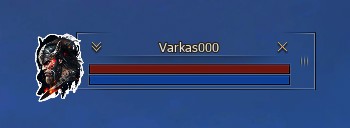
We have added stickers to the game, which are displayed to the left of the Objective window.
Objective window with sticker
How to buy a sticker
-
Buy sticker tickets at
 Game Store (200 pcs. = 200 Units);
-
Open the game's main menu (key X or ALT+X);
-
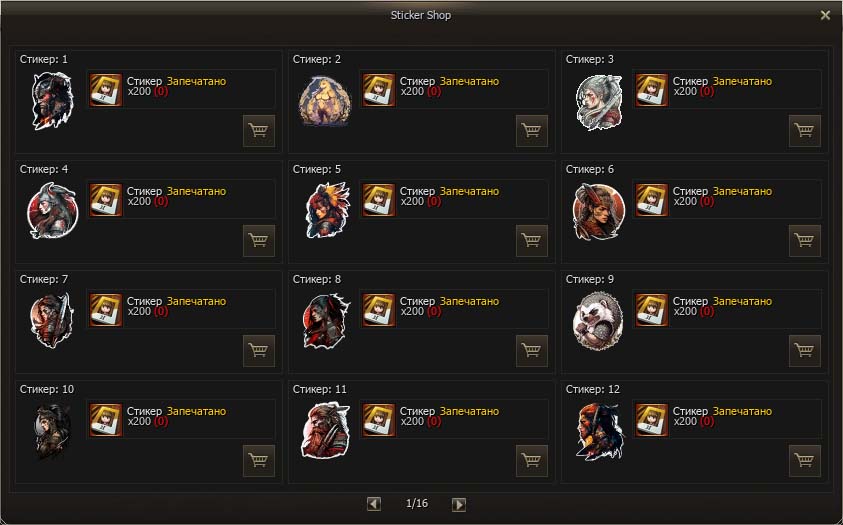
Select the Stickers section to open the Sticker Shop and purchase using the button.
 Game Store (200 pcs. = 200
  Units);
 the game's main menu (key X or ALT+X);
 Stickers section to open the Sticker Shop and purchase using the button.
✅ Now all players can see the sticker when selecting an Important character in the Target.
To change a sticker, you need to purchase a new one in the Sticker Store.
Sticker Shop
Другие статьи этой категории
- Referral System,
- Starter Packs,
- Soul Crystal,
- Clan Halls,
- Fortress,
- Castle Sieges,
- Common Craft,
- Bonus Start,
- Project rules,
- Aden Laboratory,
- DKP-System,
- Weapon Appearance Treatment,
- Auto-Hunting (Features and settings),
- Great Olympiad,
- Character Stats,
- Class Balance x1,
- Location Changes and Champion Monsters,
- Alchemy,
- Purge,
- Pattern Switching System,
- Expanded Command Channel Features,
- Expanded Party Window Features.